
PICKUP MANIFESTPM-2026-0841
أسطولك | OSTOOLAK- Warehouse
- Al Sulay
- Driver
- Ahmed Alsalem
- Shipments
- 30
- COD
- SAR 3,820
01907 418 263#10438SAR 286
02907 418 264#10439SAR 174
03907 418 265#10440—
04907 418 266#10441SAR 420
Warehouses and fulfillment
Organize picking, checking and packing, print the label and prepare the pickup batch. Confirm exactly what the driver received.
Pick, check, pack and record pieces and weight before release.
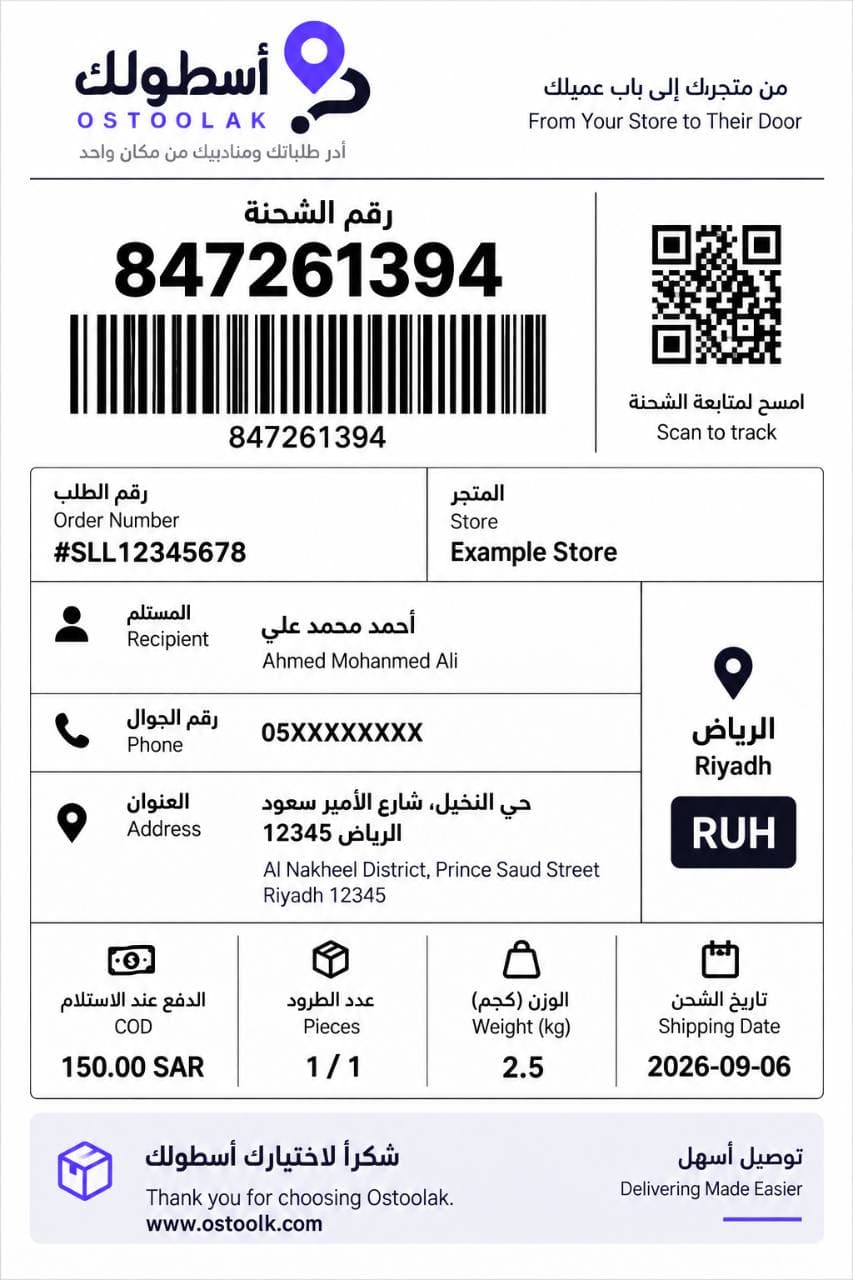
A 4×6 label with shipment, order, destination, weight, COD, barcode and customer tracking QR.
Select warehouse, driver and ready shipments to create a saved printable handover batch.
Opening or printing a manifest never transfers physical custody.
Each shipment is scanned and physically confirmed before driver custody begins.
Missing, damaged or warehouse-left shipments keep a documented disposition.
Close only after every item is resolved; print and reprint remain audited, non-custody events.
Driver custody ends only after the warehouse scans and confirms physical return receipt.
Set the fulfillment and receipt location and permitted driver locations.
The approved 4×6 label combines the number, barcode, destination and handling details.
The manifest groups one batch. Printing or reprinting never transfers custody.
Only individually confirmed shipments move into driver custody.
A return remains in driver custody until the warehouse confirms physical receipt.